
How high or low should I bid?
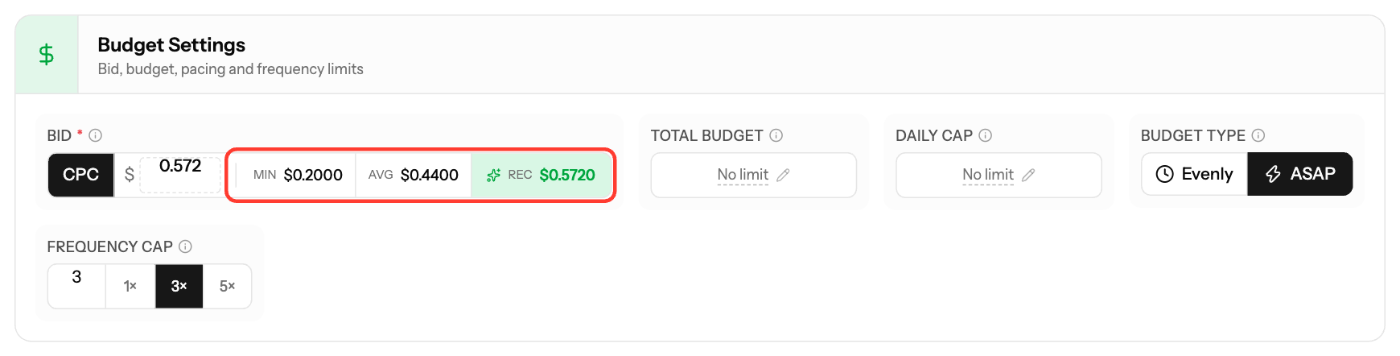
Start at or above the Avg bid shown in the bid field, and move toward Rec if you need more volume. Your bid can never be lower than the minimum for your format and countries.
Bid hints
The Bid field in campaign creation and in Edit Campaign shows three values:
- Min: the lowest accepted bid. May have limited reach.
- Avg: a balanced bid for steady traffic volume.
- Rec: a competitive bid for better reach and performance.
Rec does not guarantee traffic; delivery also depends on targeting, creatives and competition.
Minimum bids
Format | Pricing | Tier 1 | Tier 2 | Tier 3 |
|---|---|---|---|---|
Push Notifications | CPC | $0.01 | $0.005 | $0.003 |
In-Page Push | CPC | $0.01 | $0.005 | $0.003 |
Pop | CPM | $0.50 | $0.30 | $0.20 |
Banner | CPM | $0.20 | $0.20 | $0.20 |
Video | CPM | $1.00 | $0.50 | $0.30 |
Direct Click | CPC | $0.01 | $0.01 | $0.01 |
Keyword | CPC | $0.10 | $0.10 | $0.10 |
If you target countries from different tiers, the minimum of the strictest tier applies (for example, US + India uses the Tier 1 minimum).
Fine-tune after launch
- Watch Win Rate in Metrics → Reports. A low win rate means your bid is not competitive.
- Instead of one bid for everything, use bid adjustments per country, OS, browser or SubID (100% = your base bid).
- To test a different bid, use Duplicate Campaign and change only the bid.
Screenshots
Related articles
- Optimization Guide for Advertisers
- Inventory Analysis - Understanding Available Traffic
- Why is my campaign not receiving traffic?
- How to blacklist/whitelist SubIDs?
Updated on: 27/09/2026
Thank you!