Articles on: Dashboard & Analytics

Inventory Analysis - Understanding Available Traffic

The Inventory Analysis feature in the EZmob DSP (Demand Side Platform) is essential for understanding available traffic sources, countries, ad formats, and targeting opportunities. This guide will assist you in effectively navigating the Inventory Analysis tool, enhancing your campaign planning and targeting decisions.


Accessing Inventory Analysis


To access the Inventory Analysis feature, please follow these steps:


  1. Log in to your EZmob account.
  2. Navigate to Inventory Analysis.


Helpful tip: Consider bookmarking the Inventory Analysis page for quick future access.


Inventory Explorer


You can access the Inventory page by clicking the Inventory tab on the Metrics page. This will direct you to a dedicated page where you can explore available ad inventory.


URL: https://dashboard.ezmob.com/advertiser/inventory


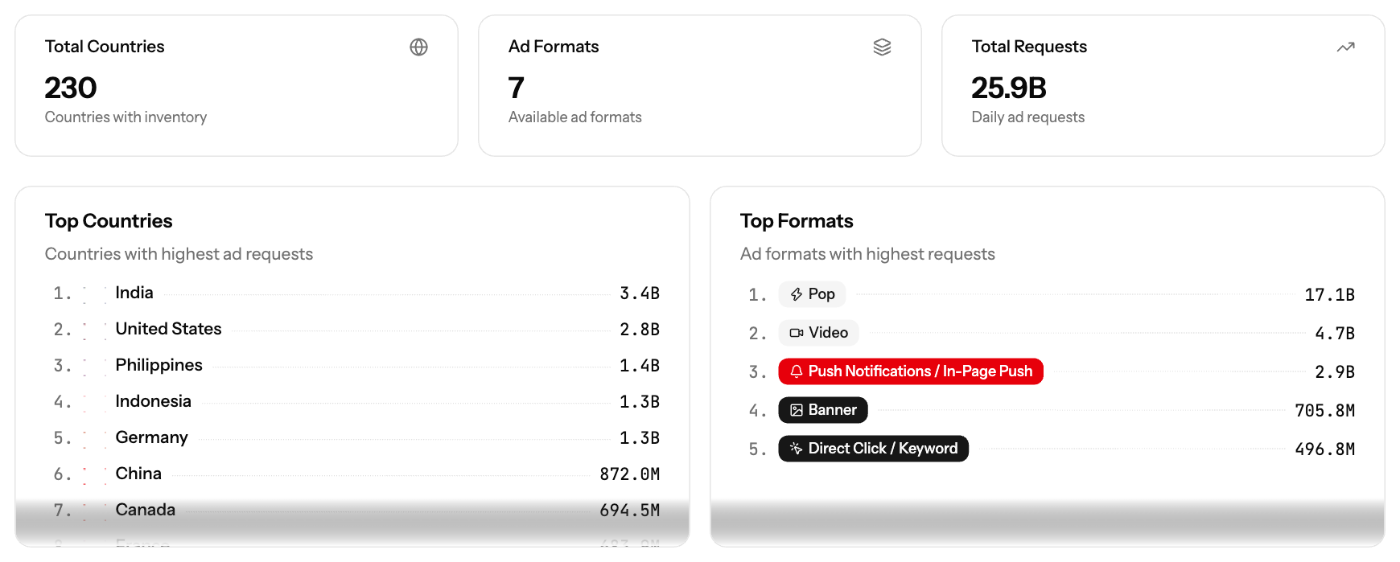
Summary Statistics


At the top of the page, you will find three key metrics:


Stat

Example Value

Description

Total Countries

233

Number of countries with available inventory

Ad Formats

7

Number of available ad formats

Total Requests

26.0B

Daily ad request volume


Top Countries


This section displays countries ranked by ad request volume:


Rank

Country

Example Volume

1

United States

5.0B

2

Brazil

2.2B

3

India

2.0B

4

United Kingdom

949.8M

5

Germany

945.4M

6

Russian Federation

859.2M

7

France

798.0M


Top Formats


This section displays ad formats ranked by request volume:


Rank

Format

Description

1

Pop

Pop-under/pop-up ad format

2

Push Notifications / In-Page Push

Push notification and in-page push ads

3

Video

Video ad format

4

Banner

Display banner ads

5

Direct Click / Keyword

Direct click and keyword-based ads


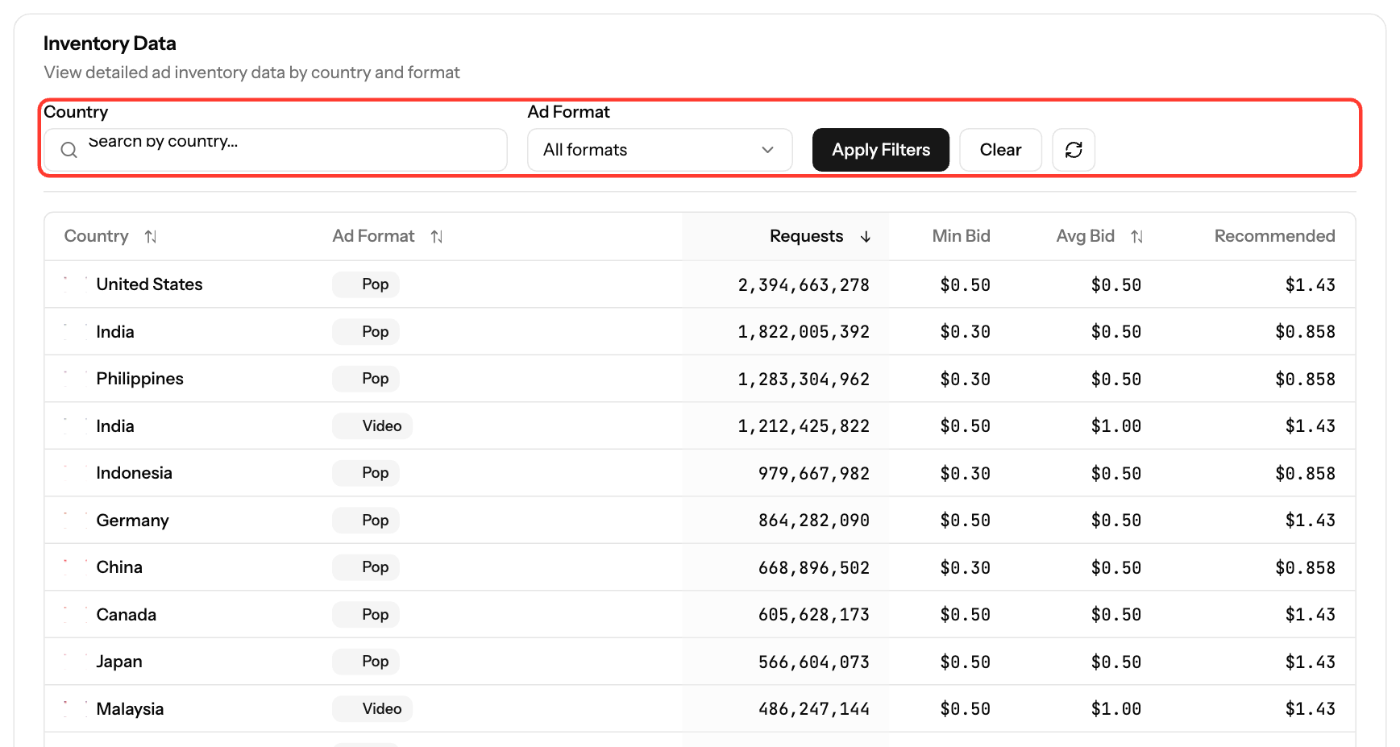
Inventory Data Table


The detailed inventory table presents granular data by country and ad format:


Column

Description

Country

Country name with flag

Ad Format

Type of ad format (Pop, Video, Push, etc.)

Requests

Daily ad request volume

Avg Bid

Average winning bid price


Inventory Filters


  • Country Search: Type to search for specific countries.
  • Ad Format Dropdown: Filter by specific ad format (default shows all formats).
  • Apply Filters: Apply your filter selections.
  • Clear: Reset filters to default.
  • Refresh (↻): Refresh inventory data.


Features of Inventory Analysis


The Inventory Analysis tool offers several key features that can enhance your advertising strategies:


  1. Traffic Volume by Country: Understand the geographic distribution of traffic to identify high-volume markets.
  2. Ad Format Availability: Explore various ad formats available, including display and mobile options. It’s important to note that video traffic volume is not available on this page.
  3. Inventory Quality Indicators: Differentiate between premium and standard placements to ensure optimal visibility and engagement rates.
  4. Filtering Options: Use filters to view inventory by type, geography, and volume, allowing for tailored campaign targeting.


Using Inventory Analysis for Campaign Planning


To maximize the benefits of Inventory Analysis in your campaigns, consider the following strategies:


  • Interpret Traffic Data: Analyze traffic volume by country and ad format to identify where your target audience is most active.
  • Budget Allocation: Allocate your budget effectively by focusing on countries and formats that show the highest traffic quality and volume.
  • Discover New Opportunities: Use inventory data to explore new geographic markets or ad formats that could enhance your campaign performance.


Real-Time Inventory Availability


The inventory data is updated in real-time, allowing you to make informed decisions based on the latest traffic availability. This ensures that your campaigns are optimized for the best possible delivery and performance.


Optimizing Campaigns with Inventory Analysis


To further enhance the effectiveness of your campaigns, consider these optimization strategies:


  • Identify High-Volume Markets: Focus on countries with the highest traffic volumes for your selected ad format.
  • Seasonal Availability Patterns: Adjust your campaign strategy based on seasonal trends in traffic availability.
  • New Targeting Opportunities: Explore untapped markets or niche segments by analyzing detailed inventory data.


Conclusion


The Inventory Analysis feature within the EZmob DSP provides powerful insights into traffic sources, ad formats, and quality indicators. By leveraging this feature, advertisers can make data-driven decisions to optimize their campaigns, enhance targeting, and allocate budgets effectively.


Advanced Metrics: CTR CPC CPA and ROAS

Creating Your First Campaign

Campaign Performance Tracking

Optimization Guide for Advertisers

Agency Campaigns


Updated on: 12/04/2026

Was this article helpful?

Share your feedback

Cancel

Thank you!