
How to check your ad code (with examples)
Always use the code from Copy Script in Sites & Placements, unchanged. Current tags load from static.qualiclicks.com and call xml.qualiclicks.com (US East) or xml-eu.qualiclicks.com (EU). Tags that use xml.ezmob.com, static.ezmob.com or static.adkernel.com are outdated: copy a fresh one.
Check your code
- Open Sites & Placements → Your Placements and click the code icon (View Script) on the placement.
- Compare it with the code on your site. Feed ID, auth key and host must match.
- Check the placement Status is Active, not paused.
- Open your page in a private window with ad blockers off. For Pop, click on the page to trigger it.
- Check Delivery Status. Green means activity in the last 24 hours.
A new placement shows Creating... for up to 3 minutes before its code works.
Example: Pop
<script>
window.adk_pdisp = {'h' : 'xml.qualiclicks.com',
  'f' : FEED_ID,
  'a' : 'AUTH_KEY',
  'ps' : [1,5],
  'cin' : 4,
  's' : '',
  'q' : [],
  't' : 24};
</script>
<script src='//static.qualiclicks.com/tabu/display.js'></script>
Parameter | Meaning |
|---|---|
h | |
f | Feed ID (required) |
a | Auth key (required) |
ps | Site clicks that open the pop, e.g. 1st and 5th |
cin | Fixed value, don't change |
s | SubID (optional), shown in your reports |
q | Keywords (optional) |
t | Cookie lifetime in hours, 1–200 (default 24) |
Example: In-page
<script>
  (function(i,n,p,a,g,e){
    i.inpagepush = i.inpagepush || function() {
      (i.inpagepush.q=(i.inpagepush.q||[])).push(arguments)
    };
    var s=n.getElementsByTagName('head')[0];
    var q=n.createElement('script'); q.async=1;
    q.src='//static.qualiclicks.com/inpage/inpage.js';
    s.appendChild(q);
    i.inpagepush('init', {
      host: 'xml.qualiclicks.com',
      feed: FEED_ID,
      auth : 'AUTH_KEY',
      subid: '',
      refresh: 120,
      position: 'top',
      slots: 2,
      query : '',
      nodesrc : true
    });
    i.inpagepush('show');
  })(window, document);
</script>
refresh is in seconds, position is top or bottom, and slots is the number of ads shown (1–10).
Example: Interstitials
In the Interstitials tag (static.qualiclicks.com/intstl/intstl.js), the timing settings are:
interval: seconds between ads, 5–300 (default 30)defer: seconds before the first ad, 1–30 (default 2)engagementPeriod: seconds, at least 11 (default 15)
Example: Redirect
https://xml.qualiclicks.com/redirect?feed=FEED_ID&auth=AUTH_KEY&url=YOUR_URL&subid=&query=Example: Banner
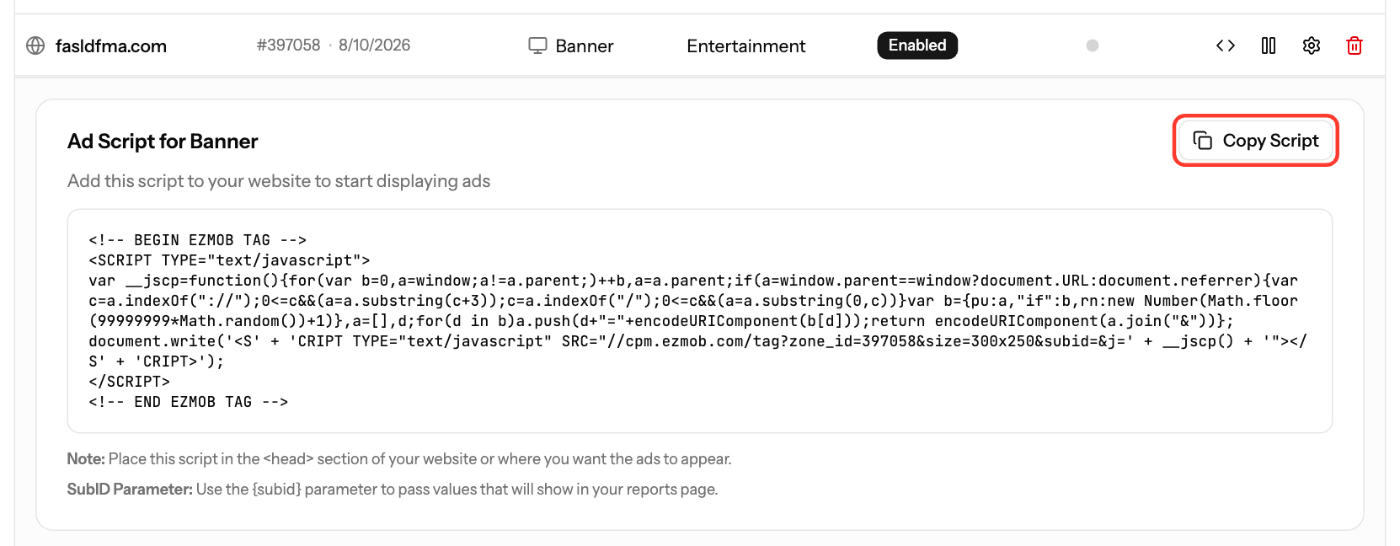
Banner tags load from cpm.ezmob.com with the zone ID and size, e.g. //cpm.ezmob.com/tag?zone_id=ZONE_ID&size=300x250&subid=. Header Bidding and Video tags use Prebid with host: 'cpm.ezmob.com' and your zoneId.
Paste Banner and Video tags inside the <body> section, where the ad should appear. Don't put them in the <head>.
Screenshots
Further reading on the EZmob blog
Related articles
- How to Create a Placement and Obtain Your Ad Tag
- Troubleshooting Ads Not Showing on Your Site
- Decrease latency with EU Ad Server Support
- How to set up Pop (pop-up and pop-under) ads
Updated on: 15/10/2026
Thank you!