
How can I fund my account?
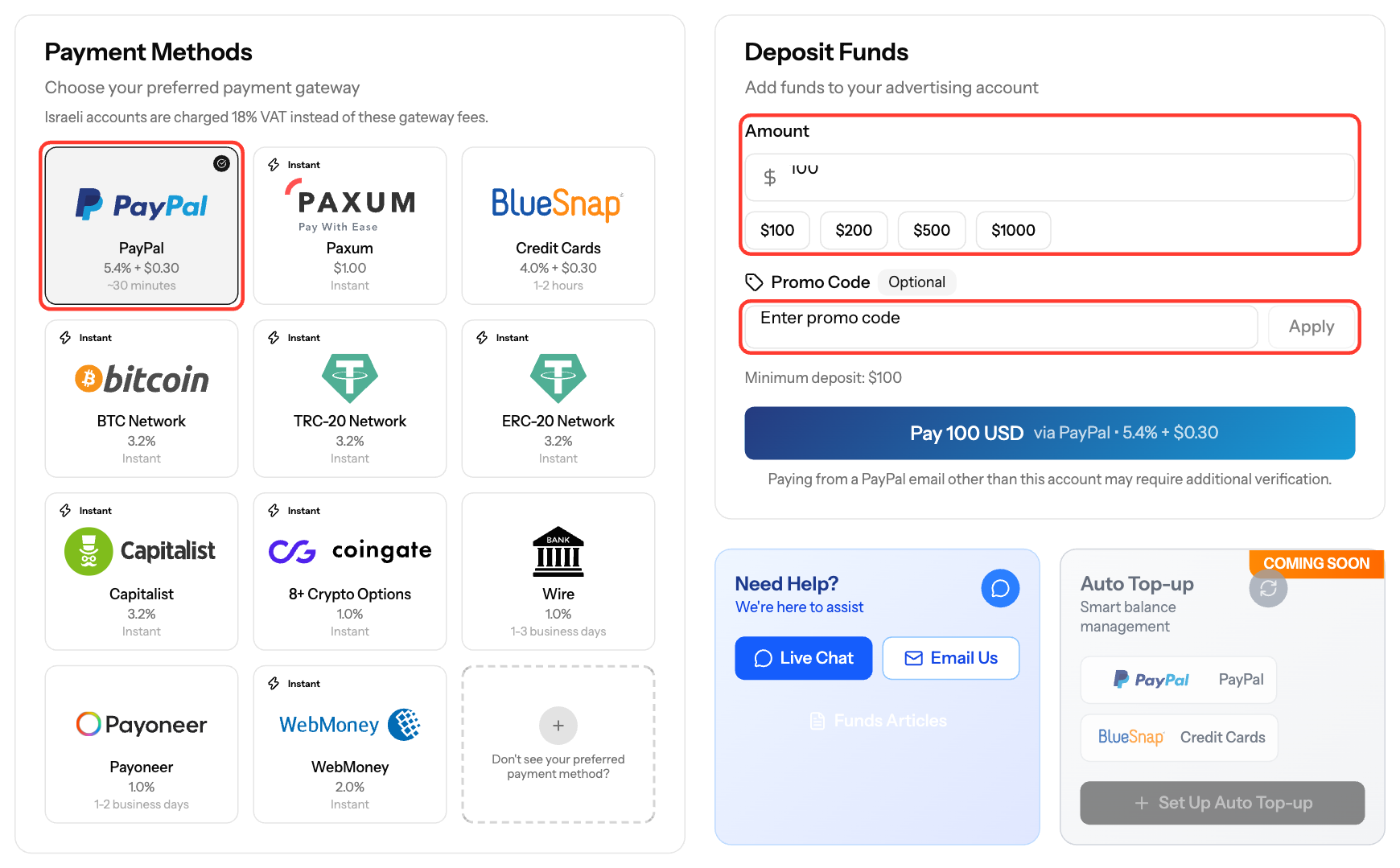
Add funds from the Funds page. The minimum deposit is $100 for most methods, $300 for USDT (ERC20) and $500 for Wire Transfer. The maximum is $10,000 per deposit, except for Wire Transfer.
Steps
- Click Funds in the sidebar.
- In Deposit Funds, enter the Amount or click one of the preset amounts.
- Optional: enter a Promo Code and click Apply.
- Under Payment Method, select a method. The fee and the final amount are shown before you pay.
- Click Pay [amount] USD and complete the payment on the gateway page. For Wire Transfer and Payoneer, click Show Payment Details and follow the instructions.
Methods and fees
Method | Fee | Processing time |
|---|---|---|
Credit Card | 4% + $0.30 | 1-2 hours |
PayPal | 4.4% or 5.4% + $0.30 (depends on your country) | ~30 minutes |
Paxum | $1 | Instant |
Capitalist | 3.2% | Instant |
Bitcoin | 3.2% | Instant |
USDT (TRC20) | 3.2% | Instant |
USDT (ERC20), $300 minimum | 3.2% | Instant |
CoinGate Crypto | 1% | Instant |
WebMoney | 2% | Instant |
Wire Transfer, $500 minimum | 1% | 1-3 business days |
Payoneer | 1% | 1-2 business days |
- The fee is deducted from the amount you pay. The rest is credited to your balance.
- Accounts in Israel pay 18% VAT instead of the gateway fees.
- Some methods are not available in every country or for every account.
- Need to deposit more than $10,000 at once? Ask your account manager to raise the limit.
After you pay
- Track the deposit in the transaction history on the Funds page.
- The first payment from a new PayPal email or a new card may need verification.
- When the deposit is completed, click the invoice icon (Download Invoice PDF) on its row.
Screenshots
Further reading on the EZmob blog
Related articles
- Wire Transfer Instructions and Bank Details
- Payoneer Transfer Guide for Advertisers
- Cryptocurrency Deposits: Bitcoin and USDT Options
- Understanding Transaction Status and Processing Times
- Using Promo Codes for Deposit Bonuses
Updated on: 15/10/2026
Thank you!