
Payoneer Transfer Guide for Advertisers
To pay with Payoneer, create the deposit on the Funds page, then send the money from your Payoneer account to payments@ezmob.com with your reference number. The fee is 1%, the minimum is $100, and funds are usually credited within 1-2 business days.
Steps
- Click Funds in the sidebar.
- In Deposit Funds, enter the Amount (at least $100).
- Under Payment Method, select Payoneer.
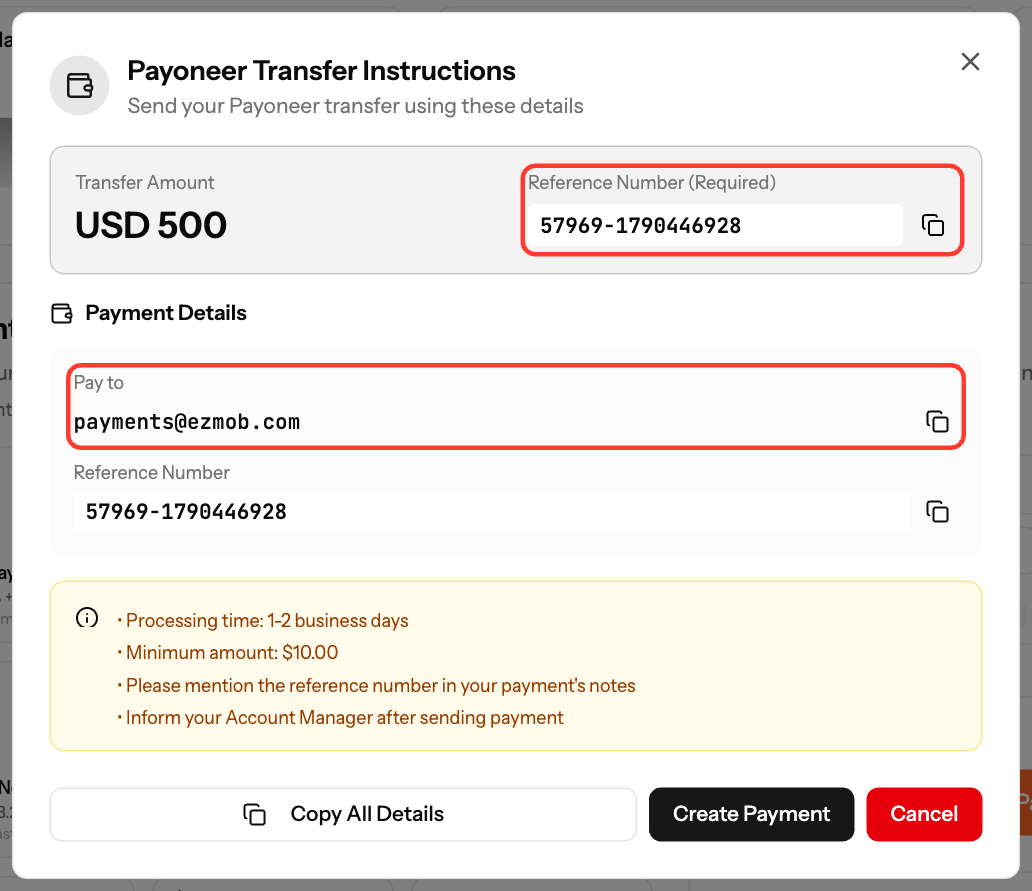
- Click Show Payment Details. The Payoneer Transfer Instructions show the Transfer Amount, the Pay to address and your Reference Number.
- Click Create Payment. It appears in your transaction history as Waiting for Payment.
- In your Payoneer account, send the transfer amount to payments@ezmob.com. Put the reference number in the payment notes.
- Tell your account manager, or support@ezmob.com, that you sent the payment.
- When we confirm your transfer, the deposit is completed, or it moves to Waiting Approval. In that case, click Approve on the transaction to add the funds to your balance.
Good to know
- Without the reference number, we cannot match the transfer to your account, and your deposit will be delayed.
- You can have up to 2 open Payoneer deposits at a time.
- Payoneer may charge its own fees or conversion rates on your side.
Screenshots
Related articles
- How can I fund my account?
- Understanding Transaction Status and Processing Times
- Wire Transfer Instructions and Bank Details
Updated on: 26/09/2026
Thank you!