
Using Promo Codes for Deposit Bonuses
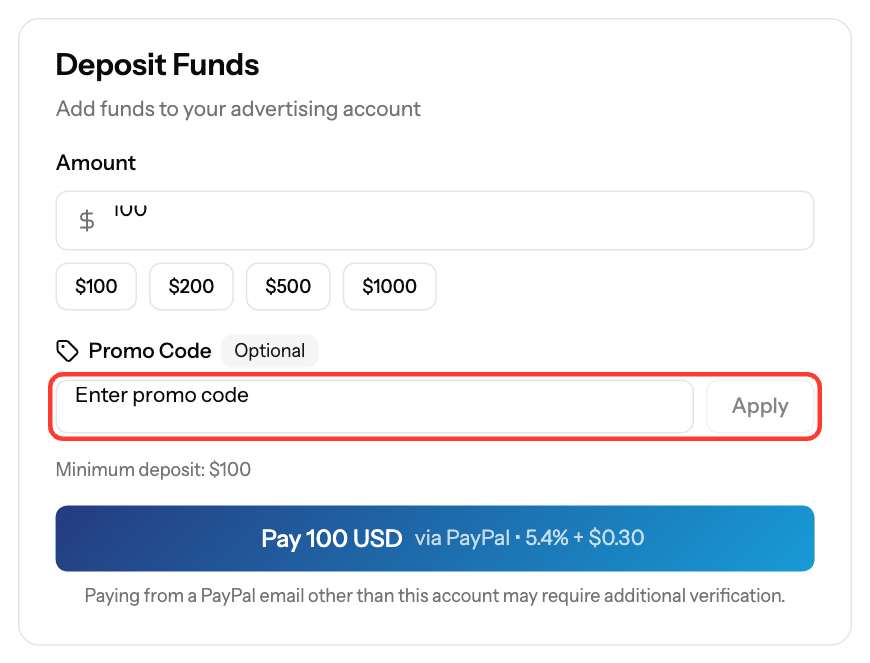
Enter a promo code in the Promo Code field when you add funds on the Funds page. Depending on the code, it reduces what you pay or adds bonus credit to your balance. Promo codes require a deposit of at least $100.
Apply a promo code
- Click Funds in the sidebar.
- In Deposit Funds, enter the Amount (at least $100).
- Select a Payment Method.
- Type the code in Promo Code and click Apply.
- Check the message that confirms the discount or bonus, then complete the payment.
If you opened a promo link, the code may already be filled in. To use a different code, click Remove.
Types of codes
Type | What you get |
|---|---|
Percentage discount | You pay a percentage less. There may be a maximum discount. |
Fixed discount | You pay a fixed amount less. |
Bonus credit | A fixed bonus is added to your balance after payment. |
Percentage bonus | A percentage of your deposit is added as bonus credit. There may be a maximum bonus. |
Why a code is not accepted
The message under the field tells you why:
- The code is not active, not yet valid or has expired.
- The code has reached its usage limit, or you have already used it.
- Your amount is below the code's minimum.
- The code is not valid for the selected payment method, your account type or your account segment.
- The code is longer than 20 characters (check for typos).
If the bonus is not in your balance after the deposit is completed, contact support@ezmob.com.
Screenshots
Related articles
- How can I fund my account?
- Understanding Transaction Status and Processing Times
- What is our refund policy?
Updated on: 26/09/2026
Thank you!