
How to upload an invoice for payment?
You don't need to upload an invoice for publisher payouts. EZmob creates it for you when your payment request is approved. Referral commission bills are different: for those, you upload a PDF invoice on the Referrals page.
Publisher payouts (Earnings)
- Request a payment from Earnings (see How to Request Payment).
- When EZmob approves the request, an invoice in your name is generated automatically. It uses the details in Settings → Profile.
- Follow the request's Status in Payments History until it shows Paid.
To make sure the invoice is right, keep your name, company, address and VAT number up to date in your profile.
Referral commission bills (Referrals)
Referral bills are created monthly, and referral commissions are paid out once they reach the $250 minimum. When a bill is ready, upload your invoice:
- Go to Referrals → Performance.
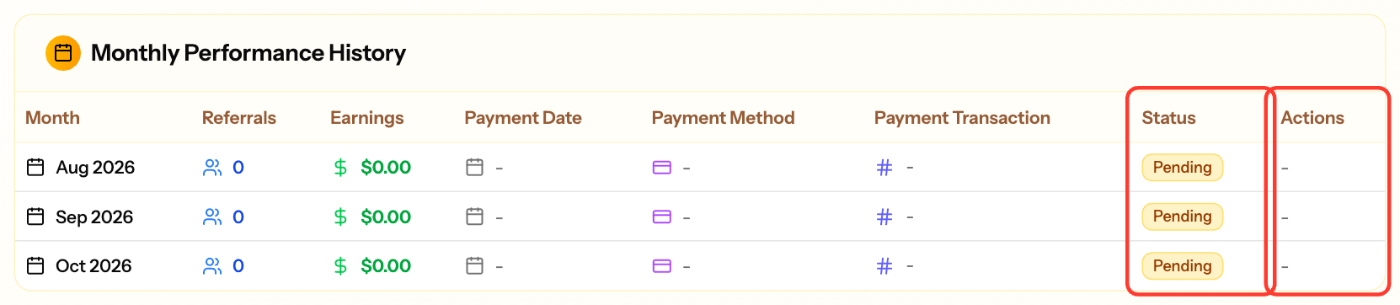
- In Monthly Performance History, find the month whose Status is Invoiced.
- In the Actions column, click Upload Invoice and choose your file.
- When the upload succeeds, the status changes to Waiting Payment. After the payment is sent, it changes to Paid.
File requirements
- PDF only
- Maximum size: 2MB
- One invoice per bill
Common issues
- No Upload Invoice button: the bill isn't at Invoiced yet, or an invoice has already been uploaded.
- Upload failed: check that the file is a PDF under 2MB and try again.
Screenshots
Related articles
- How to Request Payment
- EZmob's Referral Program for Publishers and Advertisers
- Updating my Publisher Profile
- Payment methods for publishers
Updated on: 01/10/2026
Thank you!