
How to Add Your Site to EZmob for Monetization
Add your domain under Sites & Placements → Add Website, then put the validation code on your homepage and click Validate. Validated sites receive premium demand; unvalidated sites can still have placements.
Add your site
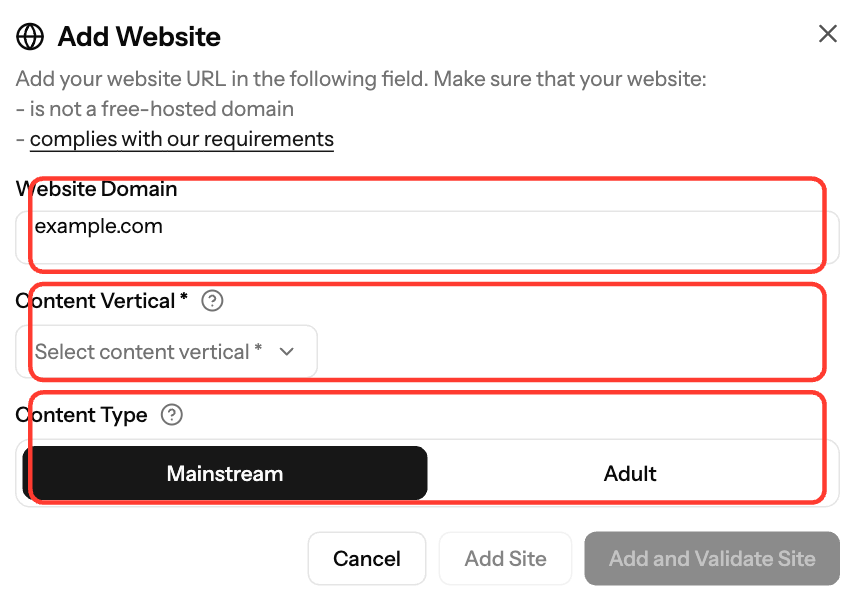
- In the sidebar, open Sites & Placements.
- Click Add Website.
- Enter the Website Domain, for example
example.com. You can include or leave outhttps://, but don't add a path. - Choose a Content Vertical.
- Under Content Type, choose Mainstream or Adult. This applies to all placements on the site.
- Click Add and Validate Site to validate now, or Add Site to validate later.
Validate your site
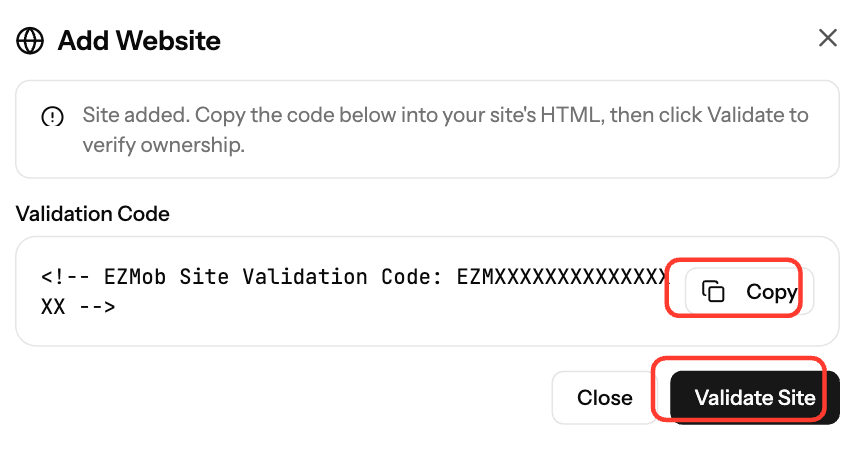
- Click Copy next to the Validation Code. It looks like
<!-- EZMob Site Validation Code: EZMXXXXXXXXXXXXXXXX -->. - Paste it into your homepage HTML, in the
<head>section or anywhere in the HTML, and publish the change. Don't edit the code. - Click Validate Site. To validate later, open the Your Sites tab and click Validate next to the site.
A validated site shows a green dot and the message "Site validated successfully."
Requirements
- Custom domain. Free-hosting and subdomain platforms can't be validated: blogspot.com, wordpress.com, wix.com, wixsite.com, weebly.com, tumblr.com, medium.com, substack.com, webflow.io, site123.me, xtgem.com, vercel.app, replit.app, onrender.com, glitch.me and pages.dev (including their subdomains). You can add such a site, but not validate it.
- Sitemap with at least 2 URLs at
/sitemap.xml,/sitemap_index.xml,/sitemap-index.xml,/sitemap/index.xmlor/sitemap1.xml. - One account per domain. A domain validated by another account can't be validated again.
- At most 5 unvalidated sites per account. Validate or delete existing sites before adding more.
- Compliant content. See Publisher Content Policy Overview.
Common issues
Message | What to do |
|---|---|
Validation code not found on your website | Check the code is live on your homepage, clear any page cache and click Validate again. |
Please make sure your site complies with our requirements | Check your sitemap has at least 2 URLs and your content follows the policy, then click Validate again. |
This domain has already been validated by another account | Contact support@ezmob.com. |
Validation is not available for this domain | Move the site to a custom domain. |
You have reached the maximum of 5 unvalidated sites | Validate or delete an unvalidated site first. |
Screenshots
Related articles
- Getting Started: Setting Up Your Publisher Account on EZmob
- How to Create a Placement and Obtain Your Ad Tag
- How to add an ad tag to section in Blogger platform
- How to add an Ad Tag to section in WordPress
Updated on: 01/10/2026
Thank you!