> ## Knowledge Base Index
> Fetch the complete knowledge base index at: https://helpdesk.ezmob.com/sitemap.xml
> Use this file to discover available pages before exploring further.
> Pure-Markdown content can be obtained by appending a '.md' suffix to the content URLs listed in the sitemap (without the trailing slash).
# 使用 EZmob 像素跟踪转化
如果您无法发送服务器端回传(postback),可以将 EZmob 图片像素添加到确认转化的页面(例如感谢页面)。请在 **回调** → **图片像素** 中复制像素代码。
## 操作步骤
1. 在侧边栏点击 **回调**,然后打开 **图片像素** 选项卡。
2. 在广告活动的 **目标 URL** 中添加 `clickid={conversion}`,例如 `https://yoursite.com/?clickid={conversion}`。参数名必须为 `clickid`,因为像素会从页面 URL 中读取该参数。
3. 将像素代码粘贴到仅在转化成功后才会加载的页面的 `` 中。
4. 确保该页面的 URL 中仍包含 `clickid`。如果转化发生在后续页面,请将 `clickid` 参数继续传递到该页面。
5. 通过真实的广告点击完成一次测试转化。在浏览器开发者工具中(**网络**(Network)选项卡),检查是否有发往 `xml.qualiclicks.com/conversion?c=...` 的请求。
6. 在 **指标** 中查看 **转化次数** 列。
## 像素代码
```html
![]() ```
## 须知
- 请先确定什么算作转化(注册、充值、购买),并仅在确认该转化的页面上放置像素。
- 重新加载确认页面可能会再次触发像素。如果每次转化只需一次调用,请使用回传。
- 像素不会传递转化价值。如需报告 **转化价值**,请使用回传 URL。
## 截图
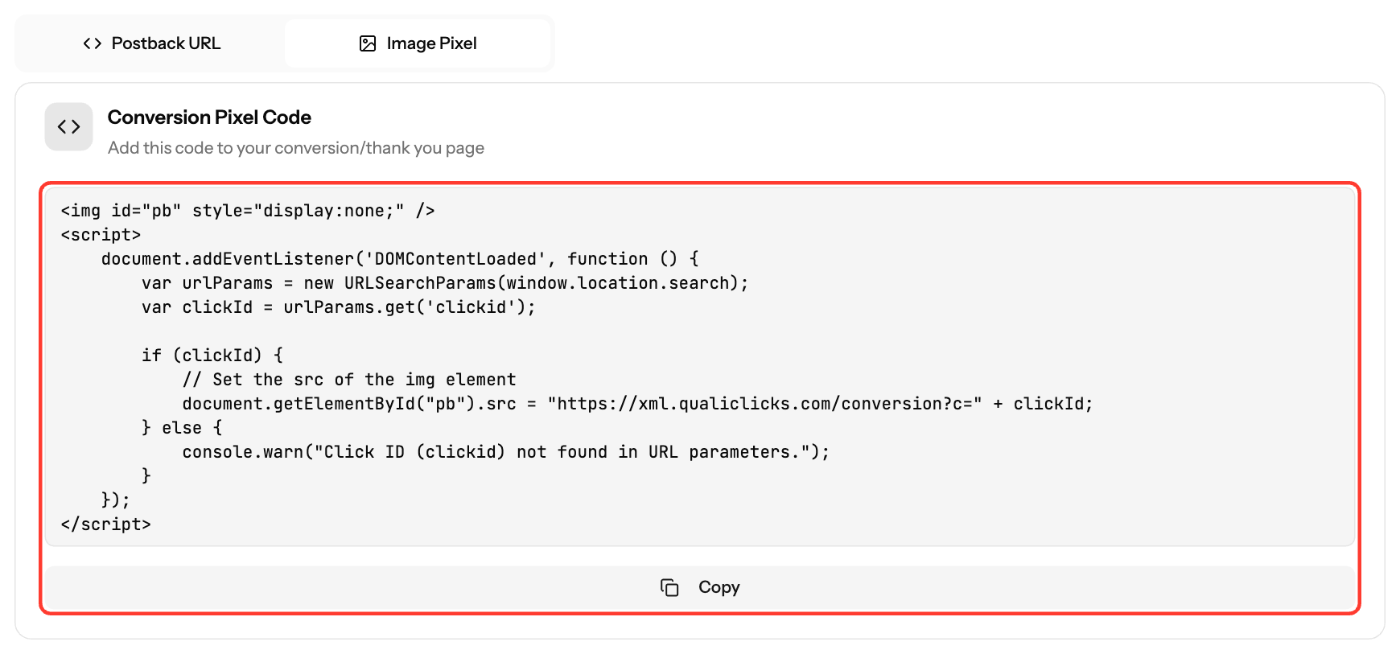
*截图为英文界面。您可以将控制面板语言切换为中文。*
## 相关文章
- [如何使用 EZmob 回传(postback)跟踪转化](https://helpdesk.ezmob.com/zh/article/how-to-track-conversions-with-ezmobs-postback-ly0hss/)
- [跟踪宏和参数详解](https://helpdesk.ezmob.com/zh/article/tracking-tokens-and-parameters-explained-cwx5ib/)
- [转化跟踪问题排查](https://helpdesk.ezmob.com/zh/article/troubleshooting-conversion-tracking-issues-1rm15ng/)
```
## 须知
- 请先确定什么算作转化(注册、充值、购买),并仅在确认该转化的页面上放置像素。
- 重新加载确认页面可能会再次触发像素。如果每次转化只需一次调用,请使用回传。
- 像素不会传递转化价值。如需报告 **转化价值**,请使用回传 URL。
## 截图

*截图为英文界面。您可以将控制面板语言切换为中文。*
## 相关文章
- [如何使用 EZmob 回传(postback)跟踪转化](https://helpdesk.ezmob.com/zh/article/how-to-track-conversions-with-ezmobs-postback-ly0hss/)
- [跟踪宏和参数详解](https://helpdesk.ezmob.com/zh/article/tracking-tokens-and-parameters-explained-cwx5ib/)
- [转化跟踪问题排查](https://helpdesk.ezmob.com/zh/article/troubleshooting-conversion-tracking-issues-1rm15ng/)