> ## Knowledge Base Index
> Fetch the complete knowledge base index at: https://helpdesk.ezmob.com/sitemap.xml
> Use this file to discover available pages before exploring further.
> Pure-Markdown content can be obtained by appending a '.md' suffix to the content URLs listed in the sitemap (without the trailing slash).
# 如何检查您的广告代码(附示例)
请始终原样使用 **网站与投放** 中 **复制脚本** 提供的代码。最新的标签从 `static.qualiclicks.com` 加载,并调用 `xml.qualiclicks.com`(美国东部)或 `xml-eu.qualiclicks.com`(欧盟)。使用 `xml.ezmob.com`、`static.ezmob.com` 或 `static.adkernel.com` 的标签已过时,请复制新代码。
## 检查代码
1. 打开 **网站与投放** → **您的投放**,点击该广告位上的代码图标(**查看脚本**)。
2. 将其与您网站上的代码进行比对。Feed ID、授权密钥(auth key)和主机必须一致。
3. 确认广告位的 **状态** 为 **活跃**,而非已暂停。
4. 在无痕窗口中关闭广告拦截器后打开您的页面。对于弹窗,请点击页面以触发。
5. 检查 **投放状态**。绿色表示过去 24 小时内有活动。
新建的广告位在代码生效前,会显示 **创建中...** 最多 3 分钟。
## 示例:弹窗(Pop)
```html
```
| 参数 | 含义 |
|---|---|
| h | 主机:`xml.qualiclicks.com` 或 `xml-eu.qualiclicks.com` |
| f | Feed ID(必填) |
| a | 授权密钥(必填) |
| ps | 触发弹窗的网站点击次序,例如第 1 次和第 5 次 |
| cin | 固定值,请勿更改 |
| s | SubID(可选),显示在您的报告中 |
| q | 关键词(可选) |
| t | Cookie 有效期(小时),1–200(默认 24) |
## 示例:页内(In-page)
```html
```
`refresh` 的单位为秒,`position` 为 `top` 或 `bottom`,`slots` 为展示的广告数量(1–10)。
## 示例:插屏(Interstitials)
在插屏标签(`static.qualiclicks.com/intstl/intstl.js`)中,时间相关设置如下:
- `interval`:两次广告之间的秒数,5–300(默认 30)
- `defer`:首次广告前的秒数,1–30(默认 2)
- `engagementPeriod`:秒数,至少 11(默认 15)
## 示例:重定向
```
https://xml.qualiclicks.com/redirect?feed=FEED_ID&auth=AUTH_KEY&url=YOUR_URL&subid=&query=
```
## 示例:横幅
横幅标签从 `cpm.ezmob.com` 加载,并带有区域 ID 和尺寸,例如 `//cpm.ezmob.com/tag?zone_id=ZONE_ID&size=300x250&subid=`。头部竞价和视频标签使用 Prebid,并带有 `host: 'cpm.ezmob.com'` 和您的 `zoneId`。
## 截图
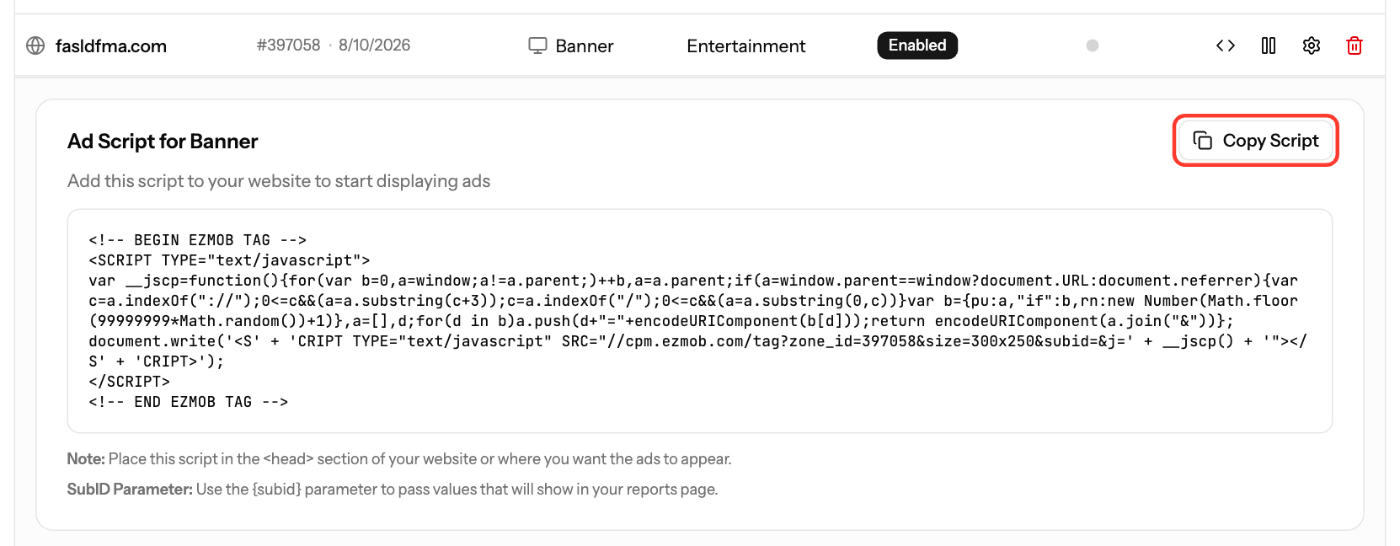
*截图为英文界面。您可以将控制面板语言切换为中文。*
## 相关文章
- [如何创建广告位并获取广告标签](https://helpdesk.ezmob.com/zh/article/how-to-create-a-placement-and-obtain-your-ad-tag-1jjrdjs/)
- [网站上不显示广告怎么办](https://helpdesk.ezmob.com/zh/article/troubleshooting-ads-not-showing-on-your-site-83fujq/)
- [使用欧盟广告服务器降低延迟](https://helpdesk.ezmob.com/zh/article/decrease-latency-with-eu-ad-server-support-1997405/)
- [如何设置 Pop(弹出和弹底)广告](https://helpdesk.ezmob.com/zh/article/pop-up-and-pop-under-variations-xxlruy/)