> ## Knowledge Base Index
> Fetch the complete knowledge base index at: https://helpdesk.ezmob.com/sitemap.xml
> Use this file to discover available pages before exploring further.
> Pure-Markdown content can be obtained by appending a '.md' suffix to the content URLs listed in the sitemap (without the trailing slash).
# How to check your ad code (with examples)
Always use the code from **Copy Script** in **Sites & Placements**, unchanged. Current tags load from `static.qualiclicks.com` and call `xml.qualiclicks.com` (US East) or `xml-eu.qualiclicks.com` (EU). Tags that use `xml.ezmob.com`, `static.ezmob.com` or `static.adkernel.com` are outdated: copy a fresh one.
## Check your code
1. Open **Sites & Placements** → **Your Placements** and click the code icon (**View Script**) on the placement.
2. Compare it with the code on your site. Feed ID, auth key and host must match.
3. Check the placement **Status** is **Active**, not paused.
4. Open your page in a private window with ad blockers off. For Pop, click on the page to trigger it.
5. Check **Delivery Status**. Green means activity in the last 24 hours.
A new placement shows **Creating...** for up to 3 minutes before its code works.
## Example: Pop
```html
```
| Parameter | Meaning |
|---|---|
| h | Host: `xml.qualiclicks.com` or `xml-eu.qualiclicks.com` |
| f | Feed ID (required) |
| a | Auth key (required) |
| ps | Site clicks that open the pop, e.g. 1st and 5th |
| cin | Fixed value, don't change |
| s | SubID (optional), shown in your reports |
| q | Keywords (optional) |
| t | Cookie lifetime in hours, 1–200 (default 24) |
## Example: In-page
```html
```
`refresh` is in seconds, `position` is `top` or `bottom`, and `slots` is the number of ads shown (1–10).
## Example: Interstitials
In the Interstitials tag (`static.qualiclicks.com/intstl/intstl.js`), the timing settings are:
- `interval`: seconds between ads, 5–300 (default 30)
- `defer`: seconds before the first ad, 1–30 (default 2)
- `engagementPeriod`: seconds, at least 11 (default 15)
## Example: Redirect
```
https://xml.qualiclicks.com/redirect?feed=FEED_ID&auth=AUTH_KEY&url=YOUR_URL&subid=&query=
```
## Example: Banner
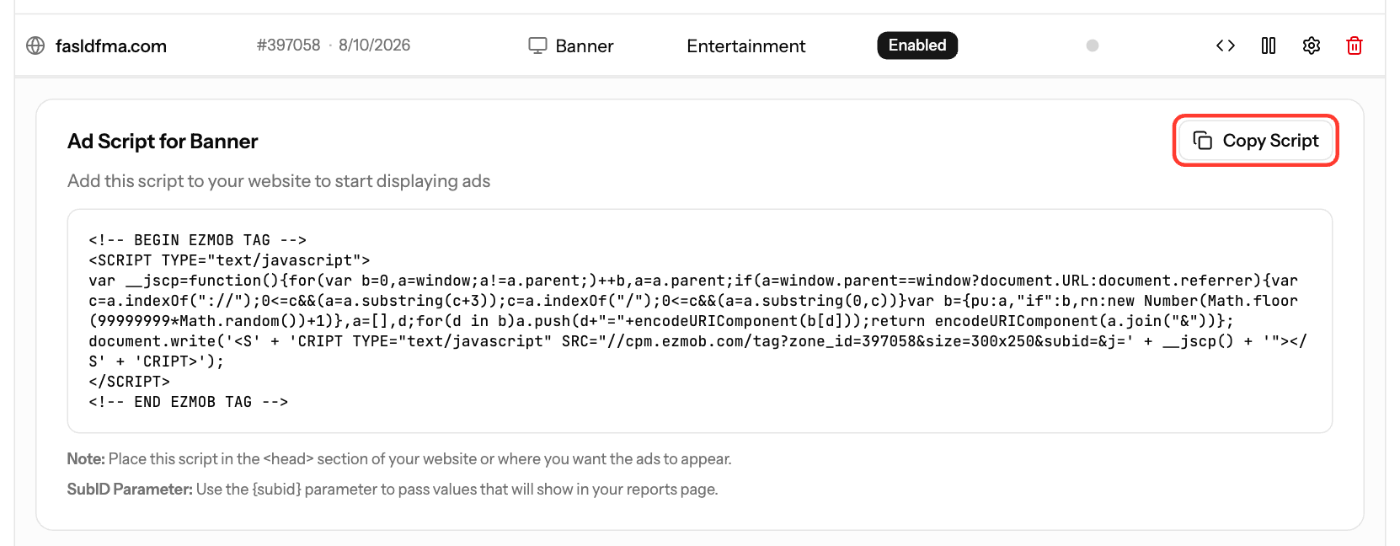
Banner tags load from `cpm.ezmob.com` with the zone ID and size, e.g. `//cpm.ezmob.com/tag?zone_id=ZONE_ID&size=300x250&subid=`. Header Bidding and Video tags use Prebid with `host: 'cpm.ezmob.com'` and your `zoneId`.
Paste Banner and Video tags inside the `` section, where the ad should appear. Don't put them in the ``.
## Screenshots
## Further reading on the EZmob blog
- [What are banner ad network scripts?](https://ezmob.com/blog/advertiser/banner-ad-network-script/)
## Related articles
- [How to Create a Placement and Obtain Your Ad Tag](https://helpdesk.ezmob.com/en/article/how-to-create-a-placement-and-obtain-your-ad-tag-415ybh/)
- [Troubleshooting Ads Not Showing on Your Site](https://helpdesk.ezmob.com/en/article/troubleshooting-ads-not-showing-on-your-site-bu4pac/)
- [Decrease latency with EU Ad Server Support](https://helpdesk.ezmob.com/en/article/decrease-latency-with-eu-ad-server-support-1setmme/)
- [How to set up Pop (pop-up and pop-under) ads](https://helpdesk.ezmob.com/en/article/pop-up-and-pop-under-variations-4hok8f/)